Most Comprehensive Finacle Wiki and commands on the web

A complete illustrative and exclusive guide of Finacle Commands

Finacle Commands , Your knowledge Partner

Get commands over finacle..

Showing posts with label Finacle. Show all posts

Monday, December 17, 2012

Memo Pad Look Up and Maintenance in Finacle , Part - I

Memo  pad  is  an  entry  whereby we  can  store  an  information  of  the  account
holder or a message which we want to be popped up at the time of operation in
the account.

There are two types of memo pads in Finacle –

System generated
User created

A.  SYSTEM GENERATED MEMO PAD

Where system on its own creates a memo pad entry. For example –

When any modification is done in CUMM, but not verified, then until the verification of CUMM is done, system shall raise an exception ‘Memo Pad Exist’ whenever account of the customer is accessed in TM or any other menu option. Once the modification in CUMM is verified / cancelled, system shall automatically remove memo pad entry.

Same is the case, when any modification is done in account using menu option ACM, but not verified.   Say there is a change in the Mode of Operation in the account but the same is pending for verification, so long the verification in the account is not done the system will continue to show the  Memo  Pad  in  order  to  remind  that  some  thing  is  pending  in  the account.  Basically, Memo Pad is a message or like a caution which used
to write in red ink on the top of the ledger page that whenever there is an operation in the account or otherwise also the system should show us that message or caution.

To make the user aware / caution about such modifications done but not verified  or  storing  a  message  which  we  want  should  be  shown  system creates a memo pad entry.

NOTE : Please  note  that  the  system  created  memo  pad  can  not  be  deleted. System shall automatically remove memo pad entry once the modifications done is either verified or cancelled.


See in the following screen the spelling of name in the customer master has  been  changed.Now  during  operation  in  the  account,  the  system shows Memo pad Exists.  That means we should inquire as to what is this before posting of the transaction.


B.  USER CREATED MEMO PAD

If a user wants to provide additional information about a particular customer / account, like documentation incomplete or any such information / irregularity, he can create a memo pad entry in the system on the account. System shall raise an exception ‘Memo Pad Exist’, whenever the account is accessed at any of the CBS branches. Please refer to ‘Adding a Memo Pad Entry’ topic for further details.


C.  MEMO PAD LOOKUP

As discussed earlier, if the system raises an exception ‘Memo Pad Exist’ and
if  the  user  wants  to  see  the  details  of  memo  pad  entry,  he  shall  follow
following steps -

1.  The system shall display exception as shown in following screen


2.  User  shall  press  Control+F9  to  see  memo  pad  details.  System  shall display Memo Pad details. 
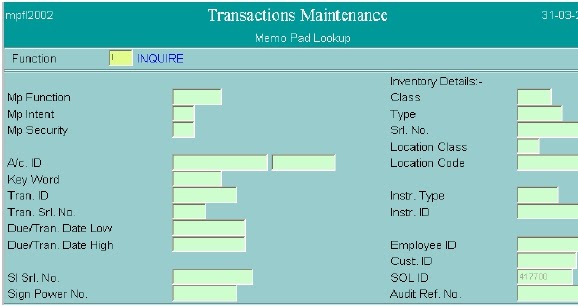


3.  Function – I (inquire). Press F4.

4.  A/c No. – Enter the A/c No. of which user wishes to inquire memo pad
entry.  Press  F4.  System  shall  display  list  of  memo  pads  like  the  one
shown in following screen.


5.  User can press Control+E (Explode) on the memo pad entry to further
see  the  details.  System  shall  display  details  of  memo  pad  like  the  one
shown in following screen.
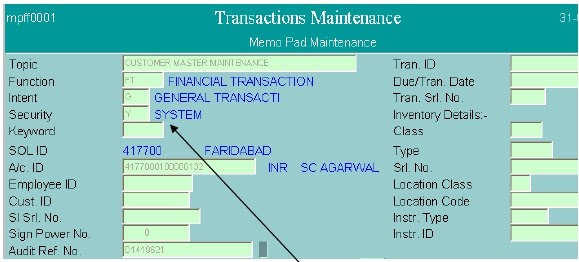
6.  From the topic and memo pad text, user can analyze the reason of memo
pad. If the value against the field Security is Y (System), then that means
it is a system generated memo pad.
7.  If the user wants to know what modifications are done in the customer /
account  details,  he  can  press  Control+E  (Explode)  on  Audit  Ref.  No.
field.   System   shall   display   table   and   key   values.   User   can   press
Control+E   (Explode)   on   the   record   to   further   see   the   details   of
modifications. System shall display the details of modifications like the one
shown in following screens.

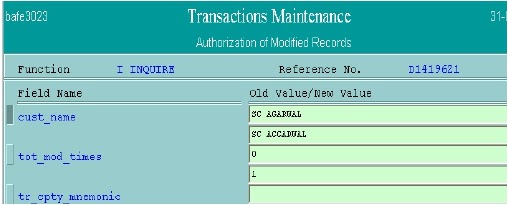


8.  After  analyzing  the  details  of  memo  pad,  user  can  press  F3’ s  until  the
system comes back to the exception list. 
9.  If the user wants to accept the exception, he can do so by pressing
F4; else, he can press F3 to quit.


Inquiry and Reports menu in Finacle related to Demand Draft


Here are few Reports Menu used for inquiry related to Demand Draft issued and DD Paid details for your reference.

SPECIFIC DD ISSUED INQUIRY – MENU OPTION ‘DDII

Using this menu option, user can inquire on the particulars of any specific DD
that has been issued.

1. Type ‘DDII’ at the finacle user menu option block and press <enter>
2. Enter DD number and date of issue and press F4.
3. System displays the particulars of the DD.
4. Press F3 to <quit>.

DD CREDITS INQUIRY – MENU OPTION ‘DDIC

Using  this  menu  option,  user  can  inquire  on  credits  that  have  gone  into  the
centralized  DD  a/c.In  this  inquiry,  system  displays  the  date  of  issue,  DD number, issuing/drawee branch code, DD amount and name of payee.  User has
to enter selection criteria.

1. Type ‘DDIC’ at the finacle user menu option block and press <enter>
2. Enter selection criteria like DD no from/to, Issue date from/to, DD amt low/high, drawee bank/branch code, purchaser a/c number, inventory
type and number, print option, print flag, print count and press F4.
3. System displays all records meeting the selection criteria.
4. To  see  further  details  of  any  specific  record,  go  to  that  record  and
<explode>. System would display further details of that record.
5. Press F3 to return to previous screen.
6. Press F3 again to <quit>.

SPECIFIC DD PAID INQUIRY – MENU OPTION ‘DDIP

Using this menu option, user can inquire on the particulars of any specific DD
that has been paid.

5. Type ‘DDIP’ at the finacle user menu option block and press <enter>
6. Enter DD number and date of issue and press F4.
7. System displays the particulars of the DD.
8. Press F3 to <quit>.

DD CREDITS INQUIRY – MENU OPTION ‘DDID

Using  this  menu  option,  user  can  inquire  on  debits  that  have  gone  into  the
centralized  DD  a/c. In  this  inquiry,  system  displays  the  date  of  issue,  DD
number, issuing/drawee branch code, DD amount and name of payee.  User has
to enter selection criteria.

DD Status Maintenance - Menu 'DDSM'

Using this menu you can inquire the DD Paid details ( Payee / Drawee Branch , DD Paid Date , Drawee details etc ). even you can re-validate a DD using this menu for draft Payment using function M and get it verified by another user.

Thursday, December 13, 2012

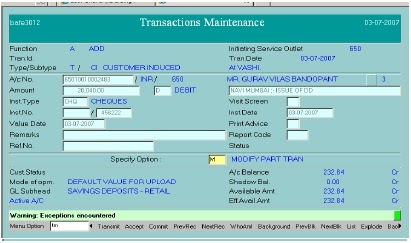
Issuing a Demand Draft using Finacle menu option TM


The  banks  provides  ancillary  services  like  remittances,  safe  deposit  locker,  credit  card  services etc.  The  remittances  services  are  most  important  ancillary  services  in  Banking  Industries.  There are   different   types   of   remittances   like   Demand   Draft,   Pay orders,   Telegraphic Transfer,   Mail Transfer, and Travelers Cheques etc.

Let us discuss the procedure regarding issuing Demand Draft / Pay order in Finacle.


For Issuing Single DD or PO

Menu Option : TM


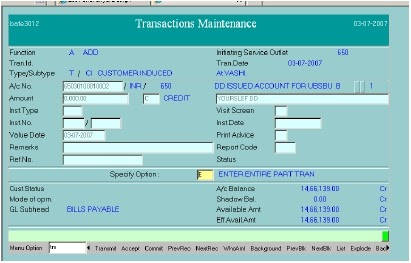
Go to the menu option TM enter then following screen will appear:


Function: A (Add) and Press F4

Enter DD Issued Account no. & Press F11 ( Note : - This is different and varies Bank to Bank, sometimes in this filed there are customized a/c or word for few Banks just type "DD" and press f4 )

Enter Amount, then ‘C’ as Credit Part-Tran and description and Press F4

After pressing F4 following screen will appear:
In above screen make entry as under:

Create Part-Tran: Y (only applicable in case DD/PO transaction is done first)
Drawn  on:  in  1st  Field  Bank  Code  is  by  default  then  in  2nd  Field  select  the 


Branch code, on which you want to draw the draft.


Enter Payee Name
Enter Purchaser’s Account No. & Press F11 then Press F4
In Print Option put ‘L’ and Press F4

Then  the  screen  of  commission  on  DD/PO  will  appear.  Accept  the  same  by 


pressing F4.


Then you  will appear on 1st Screen of TM. In specify option press down arrow 


and   go   in   debit   part-tran   of   customer   account   then   following   screen   will 
appear:


In specify option put ‘M’-Modify & Press F4 then insert Instrument Type, number and

date. Press F4 again. Then put ‘P’-Posting Requested in specify option & Press F4 in
every part-tran. Finally, Press F10 for commit.

Now, DD Set-up is over. Send the transaction for verification.

Tuesday, December 11, 2012

Category wise Commonly used Finacle Menu Options

Here are the commonly used finacle menu options/ commands listed categorywise for your reference. 


Menu Option
Description
CUSTOMER MASTER RELATED
CUMM
To Add, Copy, Suspend, Inquire, List, Modify, Unsuspended,
Verify and Cancel a Customer Master.
CUMI
Inquiry on customer record
CUS
Inquiry on Customers based on selected criterion/ criteria
CUIR
Interest Certificate for customers
CUMP
Customer Master Print
CUSTBALP
Balances for different accounts of a customer
ACCOUNT OPENING / MAINTENANCE
OAAC
For opening SB/CA/TD/Cash Credit/Loan/OD accounts
OAACAU
To verify account opened under OAAC
ACM
To Modify/Inquire the Account
ACLI
Account ledger inquiry
ACCBAL
Account balances
ACS
Account Selection Criteria
INTTM
For changing the interest rate
ACINT
For running interest calculations
AITINQ
Inquiry on interest in accounts
TDSCALC
For calculating the TDS
ACMP
Master print for accounts
PSP
Printing statement of accounts
TRANSACTION MAINTENANCE
TM
Putting through transactions
TI
Inquiry on specified transactions
FTI
Inquiries for financial transactions
TEI
Inquiry on exceptions in transactions
INVENTORY MAINTENANCE
IMAUM
Maintain authorized users for inventory
IMC
Inventory movement between locations
IMI
Inquiry on inventory
ISI
Inventory split merge and inquiry for inventory held by self
ISIA
Inventory split, merge and inquiry for inventory held by others
CHEQUE BOOK & STOP PAYMENT RELATED
ICHB
Issue of cheque books to customer accounts
ICHBAU
Verification of cheque books issued to customers
CHBM
Inquiries relating to cheque book maintenance
SPP
To input stop payments
SPPAU
To authorize stop payments
INQACHQ
Inquire on the basis of cheque number
LIEN & FREEZE
AFSM
For freezing/ unfreezing the accounts
ALM
Account Lien (mark / unmark) Maintenance
ACCOUNT TOD MAINTENANCE
ACTODM
For granting TOD

Posts Category wise :

      CBS Manual – Finacle Menus/ Commands for your ready reference


·         Huge Collection of 938 Finacle Menus

·         286 Selective Finacle Menu options

·         Category wise Commonly used Finacle Menus

·         Finacle Menu options/ Commands for Bank Auditors

·         Frequently used Function keys in Finacle


      Customer ID & Account Opening related Menu Options / Commands


·         Customer ID creation and Verification in Finacle by using CUMM menu

·         Customer ID creation in finacle in short by using CUMM menu

·         Changing Customer ID of a Customer

·         Account Opening (Savings/Current) in Finacle using menu option OAAC

·         Account opening in Finacle – in short

·         Frequently asked questions related to Customer ID  and Account Opening


      Demand Draft / Pay Order related Menu Options / Commands


·         Issuing a Demand Draft using Finacle Menu options TM

·         Issuing Multiple Demand Draft / PO using Finacle menu option TM

·         Printing Demand Draft / PO using menu option DDPRNT

·         Cancellation of Demand Draft  in Finacle using menu option DDC

·         Marking a Demand Draft Lost and issuing Duplicate DD

·         Inquiry and Reports finacle Menu related to Demand Draft


      Miscellaneous Finacle Menu Options / Commands


·         Standing Instruction Maintenance using Finacle Menu Options SIM.

·         Creating a Memo Pad in Finacle Part - I.

·         Creating a Memo Pad in Finacle Part - II.

·         Deleting Memo Pad in Finacle

·         Mass Transaction Posting in Finacle using Finacle Menu option TTUM.

·         Freezing & Unfreezing of accounts in finacle using Finacle Menu AFSM

·         Passbook Printing in Finacle

·         Finacle Teller Cash account Maintenance using Finacle Menu GECM

·         Finacle Menu option TM  for Transaction Posting and Maintenance