Most Comprehensive Finacle Wiki and commands on the web

A complete illustrative and exclusive guide of Finacle Commands

Finacle Commands , Your knowledge Partner

Get commands over finacle..

Showing posts with label about finacle. Show all posts

Monday, December 17, 2012

Memo Pad Look Up and Maintenance in Finacle , Part - I

Memo  pad  is  an  entry  whereby we  can  store  an  information  of  the  account
holder or a message which we want to be popped up at the time of operation in
the account.

There are two types of memo pads in Finacle –

System generated
User created

A.  SYSTEM GENERATED MEMO PAD

Where system on its own creates a memo pad entry. For example –

When any modification is done in CUMM, but not verified, then until the verification of CUMM is done, system shall raise an exception ‘Memo Pad Exist’ whenever account of the customer is accessed in TM or any other menu option. Once the modification in CUMM is verified / cancelled, system shall automatically remove memo pad entry.

Same is the case, when any modification is done in account using menu option ACM, but not verified.   Say there is a change in the Mode of Operation in the account but the same is pending for verification, so long the verification in the account is not done the system will continue to show the  Memo  Pad  in  order  to  remind  that  some  thing  is  pending  in  the account.  Basically, Memo Pad is a message or like a caution which used
to write in red ink on the top of the ledger page that whenever there is an operation in the account or otherwise also the system should show us that message or caution.

To make the user aware / caution about such modifications done but not verified  or  storing  a  message  which  we  want  should  be  shown  system creates a memo pad entry.

NOTE : Please  note  that  the  system  created  memo  pad  can  not  be  deleted. System shall automatically remove memo pad entry once the modifications done is either verified or cancelled.


See in the following screen the spelling of name in the customer master has  been  changed.Now  during  operation  in  the  account,  the  system shows Memo pad Exists.  That means we should inquire as to what is this before posting of the transaction.


B.  USER CREATED MEMO PAD

If a user wants to provide additional information about a particular customer / account, like documentation incomplete or any such information / irregularity, he can create a memo pad entry in the system on the account. System shall raise an exception ‘Memo Pad Exist’, whenever the account is accessed at any of the CBS branches. Please refer to ‘Adding a Memo Pad Entry’ topic for further details.


C.  MEMO PAD LOOKUP

As discussed earlier, if the system raises an exception ‘Memo Pad Exist’ and
if  the  user  wants  to  see  the  details  of  memo  pad  entry,  he  shall  follow
following steps -

1.  The system shall display exception as shown in following screen


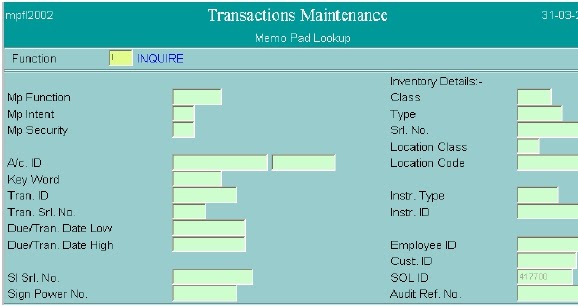
2.  User  shall  press  Control+F9  to  see  memo  pad  details.  System  shall display Memo Pad details. 


3.  Function – I (inquire). Press F4.

4.  A/c No. – Enter the A/c No. of which user wishes to inquire memo pad
entry.  Press  F4.  System  shall  display  list  of  memo  pads  like  the  one
shown in following screen.


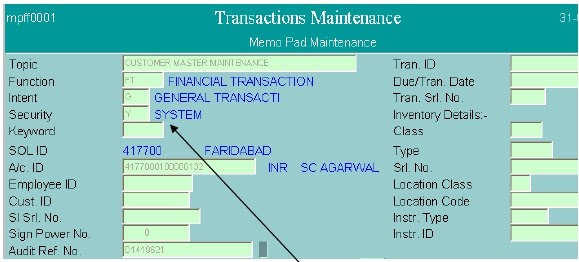
5.  User can press Control+E (Explode) on the memo pad entry to further
see  the  details.  System  shall  display  details  of  memo  pad  like  the  one
shown in following screen.
6.  From the topic and memo pad text, user can analyze the reason of memo
pad. If the value against the field Security is Y (System), then that means
it is a system generated memo pad.
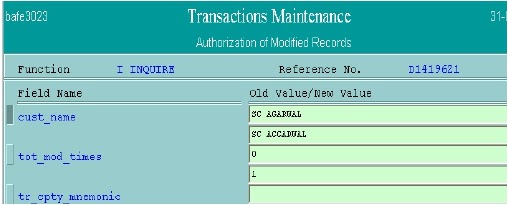
7.  If the user wants to know what modifications are done in the customer /
account  details,  he  can  press  Control+E  (Explode)  on  Audit  Ref.  No.
field.   System   shall   display   table   and   key   values.   User   can   press
Control+E   (Explode)   on   the   record   to   further   see   the   details   of
modifications. System shall display the details of modifications like the one
shown in following screens.


8.  After  analyzing  the  details  of  memo  pad,  user  can  press  F3’ s  until  the
system comes back to the exception list. 
9.  If the user wants to accept the exception, he can do so by pressing
F4; else, he can press F3 to quit.


Tuesday, November 27, 2012

Customer Id & Account Related FAQs


Customer Id  & Account Related FAQs

1.      I created a customer record but I could not note it down. From where to find out the customer ID so that the record can be verified by the officer?
  • Go to AFI and give the table short name as CMG and enterer_id as your user-id and give entered on as today’s date and authorized flag as “N” and press-f4 to know the customer-id.

2.      How to get the inquire/print of all the accounts of a customer?
  • To Inquire-Go to CUMM give the cust-id and use sub-option A- to know all the accounts pertaining to this cust-id.
  • To print-Go to ACDET and give the cust-id.

3.      I opened an account but forgot to note down the ZZ number. From where to find this ZZ number so that the officer can verify the account?
  • Go to AFI and give the table short name as GAM and enterer_id as your user-id and give entered on as today’s date and authorized flag as “N” and press-f4 to know the customer-id.

4.      I do not know how to find out the Limit Liability details of a customer
  • CUMM- H

5.      While posting a transaction, I get a message “Memopad exists”. How do I know what is wrong with the account?
  • While in ACM menu option press Ctrl+F9 to Inquire on the Memo Pad details of the given account.

6.      I have opened an account under the wrong Scheme code. How do I rectify it?
  • Use ACXFRSC to transfer accounts between schemes.  This option cannot be used to transfer Term deposit accounts from one scheme to another scheme.  Example : From a IO type of scheme to II type of scheme.  Hence for Term Deposit Account scheme changes, close the old account and open a new account in correct scheme code with a value date.

7.      How to change the rate of interest of an account?
  • Use INTTM option and select the appropriate interest rate codes and give
start-date and end date.

8.      How to know the net interest rate applied on a given account?
  • Use ACM option – 0 – General Details and go to second screen to look at net interest rate.
1.      How to enhance / reduce / withdraw the Sanction Limit/Drawing Power in a account?
  • Use HACLHM  option.

2.      How to mark lien on an account?
  • Use ALM option

3.      How to change the status of account – from Inactive to Active and from Dormant to Active?
  • Use ACM – 0 – General Details and change the status to A-Active

Monday, November 19, 2012

Get familiar with Finacle Menus/ Commands and Favorites

 Being new to the finacle environment you must have queries related to use of the menu options in finacle and how these commands executes and for i present this post and hope this will surely help from novice to experienced banker
A. FINACLE USER MENU/COMMANDS :
Once the user successfully logs into Finacle, he/she shall get list of finacle menus as per the type of user, e.g. if the user logs into finacle as DBA, he/she may get different list of menus than a general user. lets have a look at the first screen after login , that shows list of menu options available to General User.

Left hand side window consists of list of menu options.  Menu options are grouped as per their use/purpose. E.g. menu options required for remittances are grouped under Remittances Menu. User can click left button of mouse on+ sign appearing on left hand side of menu to expand it further. User shall get list of menu options as shown in screen . E.g. If user click on + sign of Customer Accounts Menu, he/she may get a list of sub menus (having + sign on left hand side, e.g. Authorization Menu, Accounts Maintenance Menu etc.)and also list of actual menu options (having short name of menu option in square brackets e.g. Interest Table Maintenance [INTTM] etc)

 •  User can click on + sign appearing on left side of sub menu to furtherexpand it.
        Or 
user can double click on actual menu option (indicated with name of menu option in square bracket) to open it.
  
B. USER DEFINED FAVORITES:
User can group frequently used menu (by him) options on right hand side windowcalled as favorites. Steps to create favorites – E.g. Steps to create favorite for Interest Table Maintenance [INTTM]
• Click mouse on finacle menu option ‘Interest Table Maintenance [INTTM].
• Press Control+C
• Click mouse on Favorites (right hand side window)
• Press Control+V Steps to remove menu/menu options from favorites –
•Click mouse on menu/menu option which is to be removed
• Press Control+X

 C.HOW TO EXECUTE MENU OPTION?

There are two ways to get into a menu option.
1. In the list of menu options or from favorites, find out the menu option to be executed and double click on it.
2. Or write the short name of the menu option in the field provided at left-bottom side of the screen with the heading ‘Menu option’ and press Enter Key.
 D. PROGRESS INDICATOR –

Progress indicator uses three different colors to indicate status of operation.
 • Green – System is ready i.e. control is currently with the browser. User can operate the system.
Yellow – Browser is performing internal processing like assembling/painting screen as per requirement. User should not operate the system.
Red –  Browser is communicating with the server. i.e. browser is sending/receiving data from server. User should not operate the system.

 E . ACTION BUTTONS
Every action button has a specific purpose. E.g. If user clicks mouse on WhoAmI button, system will display user_id of the user who is currently logged in & other information like date, name of SOL in a rectangular box.Use of these action buttons shall be discussed later in this chapter.
I. MESSAGE AREA/HELP BAR –
In finacle, if user needs any help in entering data in a field, he shall bring thecursor in that field and press F1 key, the system may display purpose of thatfield on this message/help bar. As also, at various stages system may displaymessages like ‘Operation Successful’, ‘Record Verified’ etc on this messagebar as and when required.
II. SCROLLING MESSAGE –
As and when Data Centre wishes to give instructions or guidelines to all theSOLs, it may communicate the same through this area. The message willkeep scrolling from right to left. There are three buttons provided on right sideof this bar – 

•Left button – Click on this button to Fast Forward the message.
•Middle button – Click on this to stop message from scrolling.
•Right button – Click on this button to Fast Rewind the message.


Wednesday, November 14, 2012

Finacle Command - TM for Transaction maintainance Part - I

TM (TRANSACTION MAINTENANCE) -  finacle command for Transactions
In day-to-day banking operation various customers are making transactions in their accounts.These transactions are either debit transactions or credit transactions. Customer makes these transactions by the way of depositing cash, withdrawing the cash or issue the transfer from one account to another account of himself or another customer.  This finacle command is used for  :- 
  • CASH DEPOSIT
  • CASH WITHDRAWL
  • TRANSFER
We can say  ACLI (Account Ledger Inquiry ) is the maiden command In finacle  , and next to learn immediate command  for any Banker is  TM (Transaction Maintance ). By using this finacle command we can create  a transaction for Cash Deposit , Cash Withdrawal , and Cash transfer from one account (Customer/office a/c) to other.

But before going in to details of this command lets first know the basics of the Maker -Cheker concept which is used extensively in finacle.Maker-checker (or Maker and Checker, or 4-Eyes) is one of the central principles of authorization in the Information Systems of financial . Here the segregation of duties plays an important role. In this way, strict control is kept over system software and data keeping in mind functional division of labor between all classes of employees.

Any transaction in Finacle has to be processed by different user i.e. same user cannot enter/Post and Verify the transaction. In other words there is  maker checker concept by two different user IDs.

In a Transaction in accounting procedure there are two basic parts  Debit and Credit. and in finacle a Transaction can have following state:
1. E - Entered 
2. P-  Posted 
3. - Reset
4. D - Deleted
5. V - Verified

1. E - Entered 
  • Transaction is in (E) entered state , actual transfer of fund not take place, accounts will be not updated in the database at server end
  • Transaction can be Reset and Can be deleted.
2. P-  Posted 
  •   If Transaction is in (P) Posted state, transfer of fund take place with immediate               effect and both accounts get updated in the database at Server end.
  •   Transaction once Posted ,can not  be Reset and Can not be deleted.
3. - Reset
  • It reset a Transaction from Entered state / Posted State.4. D - Deleted
  • When a transaction or part transaction is deleted , it will be in deleted state.
5. V - Verified
When a transaction is verified by another user , it will be in Verified state.

While creating a Transaction  following functions are used. for creating a new Transaction (Deposit/Withdrawl/Transfer) we use function A . and when we want to copy a transaction we can use function C , after creating transaction i

FUNCTIONS:
A- ADD
C- COPY
D- DELETE
I - INQUIRE
M- MODIFY
V- VERIFY
R- RESET

SUB TYPE
The Sub Type Transaction specify mode of the Transaction.
  •  i.e for Payment by a Cashier to a Customer , the Cashier uses NP ( Normal Payment ) for debitting his Customer's account and credit Teller acccount and for reciept , the cashier used NR ( Normal Reciept) for receiving  cash from the Customer and credits customer account by debitting Teller account.
  •  if a customer account has to be debitted or credited in a transaction we have to use CI ( Customer Induced) 
  • if any Office account has to be debitted or credited in transaction we can use BI (Bank Induced)
Frequently used Different Subtypes:
Though Different Banks have numerous Sub Types for different Purpose following are the frequently Used Sub Types.
C-CASH
L-CLEARING
T-TRANSFER
NP-NORMAL PAYMENT   
NR-NORMAL RECEIPT
CI-CUSTOMER INDUCED
BI- BANK INDUCED
EO- ECS Outward Transaction
EI - ECS Inward Transaction 

Instrument Type :
Instrument Type in a transaction can be Cheque (CHQ), Withdrawal Slip (WD) , Debit Voucher (VD), Credit Voucher (VC)

TO CREATE THE SECOND LEG of a Transaction :
To create the second leg of a Transaction press DOWN ARROW - 
E-ENTRY
P-POSTING
V-VERIFY

Q AND F4 - For Quitting the Transaction.


Tuesday, November 13, 2012

Frequently used Finacle Commands


1.     To change education loan from simple rate of interest to compound rate of interes 
         EDUEMI
2.     Cheque already paid in system can be marked as unpaid by- UCS
3.     To inquire account number on the basis of cheque number and sol id – INQACHQ
4.     Mutual fund transfer transaction- MFTM
5.     Request for duplicate pin for debit card- DPINREQ ; ATMCRA
6.     Change account manager of customer- CAMC
7.     Krishi card maintenance- KCM
8.     Scheme wise distribution of deposit under fixed deposit- SDD
9.     To print SI covering letter to customer- SICL
10.   What if analysis of account liability- WIALL
11.   To change the service outlet of an employee- CSE ; CCS
12.   TO give TRACKING NO. to remitter at the time of remittance- XOOM
13.    File transfer protocol- FTP
14.   To recover charges from account for duplicate passbook, duplicate demand draft – GCHRG
15.   Option code for enquiry on the exception raised by system- K
16.   Inquiry can be made on account opened between two dates by using- GDET
17.   House loan under simple rate of interest can be opened by- TLSHL
18.   Inward clearing can be uploaded by- Pcunix (SERVICE BRANCH)
19.   for receipt of DIRECT taxes- OLTAS (online tax accounting system)
20.    to combine the custids of customers – CCA
21.   Apply for duplicate password OF user- IBSRPOST
22.   Interest rate modification- INTTM
23.   Generation of interest rate advice- INTADV
24.   To print the voucher- VCHR
25.   credit card application- CCAPPL
26.   Relaxation of inter-sol charges- ISOCR
27.   Ledger print out of office accounts-  ACLPOA
28.   TO change the GL subhead code- TACBSH
29.   TO unlock the user id- SAC
30.   To restrict certain users to restrict certain accounts- AACM
31.   TO attach teller duties to a user- GECM
32.   To change your password on your own- PWMNT
33.   Any kind of financial transaction (transfer, receipt, payment) - TM
34.   Details (deep) of account balance- ACCBAL
35.   TO reverse the proxy transaction – SPTM
36.   Interest run for an a/c- ACINT
37.   Inquire into the exceptional transactions- TEI
38.   VERification of the exceptional transactions- TEA
39.   Inquiry for MINIMum work class required to post and approve a transaction- EXCDM
40.   TO reverse a transaction – HCRT
41.   Print the transaction advice (to send to customer about bank induced charges)- ADVC
42.   Option to inquire if a transaction is balanced or not- L
43.   Cancellation of DD/PSI- DDC
44.   Payment of dd- CDDMP
45.   Payment of PSI–TM
46.   Account balance of particular cust id- CUSTBALP
47.   To know the total deposit for a customer- ACMP
48.   Interest certificate- INTCERT
49.   To view the standing instructions for a customer id- SII
50.   Opening, suspending, releasing, regularizing the outward clearing zone(be extremely   careful)- MCLZOH then O, S, R, G respectively each function after one day gap.
51.   Reversal of wrongly debited ATM payment- ATMREV
52.   TO check if a DD is printed or not? – DDPALL
53.   To unlock an outward clearing zone – UNLKZ
54.   TO generate report of turnover, min, max balance, avg balance- ATOR
55.   Upload transactions through a floppy – TTUM
56.   Find out a/cS opened  and closed during a specific period- ACS
57.   View, modify, very, inquire informations about users/ user profile management- HUPM
58.   INQUIRE abt enries pending for posting or verification- FTI
59.   Inquire abt non-finacial entries pending for posting or verification- AFI
60.   To check the scheme code parameters- GSPI
61.   TO check interest parameters- TVSI
62.   TO Create customer id- CUMM
63.   TO create the account number of customer- OAAC
64.   Verify account after generation- OAACAU
65.   To unfreeze and freeze the accounts- AFSM
66.   Generate the interest reports for all types of accounts- AINTRPT
67.   TO change the scheme code if it is entered wrongly- ACXFRSC
68.   To credit FFD amt. to SB a/c- SWOPS
69.   TO charge a/c closure charges- CACC
70.   To close an a/c- CAAC
71.   To verify closure of an acc.- CAACAU
72.   TO Set THE temporary overdraft limit (for cash credit a/c and OD a/c)- ACTODM
73.   TOD Inqiry- ACTODI
74.   To give the sanction limit and drawing power- ACLHM (if not performed timely, face exception- “limit sanction expired”)
75.   To add the security- SRM
76.   TO print acc. Statement- PSP
77.   To or remove the lien amount – ALM
78.   To jotting the number of a/c opened and many more information- ACSP
79.   To take ledger print of customer accounts- ACLPCA
80.   For transferring cash from one branch to another branch- CASHTR
81.   Request for cheque book generation- CREQ; ICHB; CHQBKR
82.   VERIFY chqbk req- CREQAU; ICHBAU
83.   To calculate interest for deposits before opening the acc.- DEPMOD
84.   To print FDR or Deposit receipts- DRP; NEWDRP
85.   To reprint the FDR or Deposit receipts- REDRP
86.   To extend the period of deposit- TDEXT
87.   To renew the FD-     TDREN
88.   To check the TDS for Particular TDS code- ASTI
89.   To refund the TDS-    RFTDS
90.   To remit TDS to govt.- RMTDS
91.   TO generate TDS REPORT/TDS CERTIFICATE/FORM 16 -  TDSIP
92.   To recover the TDS shortfall from the customer- RECSHF
93.   Account limit history maintenance-  ACLHM
94.   Limit tree lookup- LTL
95.   Limit node maintenance- LNM
96.   Outward remittance maintenance- ORM
97.   Inward remittance maintenance- IRM
98.   GUARANTEE master maintenance- GMM
99.   GUARANTEE inquiry- GI
100. Guarantee printing- GP
101. GUARANTEE jotting- GILR
102. BILL maintenance- BM
103. BILL inquiry- BI
104. Foreign BILL maintenance-FBM
105. Foreign bill INQUIRY- FBI
106. Foreign bill balancing register- FBBR
107. Foreign bill advice printing- FBADVP
108. HOW to delete/modify outward clearing in verified status – open a new zone in   MCLZOH other than outward clearing zone. Then TROFSETS- transfer the entry from outward zone to new zone. Delete/ modify entry in new zone.
109. Verify outward clearing entries- OCTM
110. VERIFY inward clg. Entries- ICTM
111. TO check whether all instruments entered in zone are verified—IOCLS
112. Wrong check series issued to account, how to destroy, reissue new series- CHBM then CHBMAU
13.Inventory management- ISIA
114.STOP cheque payment- SPP then SPPAU
115.TO transfer inventory from one operator to another- IMC
116.Employee file maintenance or users’ functions management- EFM
117.Role profile management- RPM
118.Disable user- PAPW
119.ACC. Ledger inquiry- ACLI
120.ACCOUNT maintenance/ modification – ACM
121.View the joint holders for an account- JTHOLDER
122.Passbook printing- PBP; NEWPBP
123.CASH WINDOW NORMAL PAYMENT/NORMAL RECEIPT- NP; NR Respectively
124.Mass posting/ verification- TV
125.Intersol transaction report- ISTR
126.Previous day transaction verification- PTV
127.Post proxy transaction- PPT
128.Abnormal transaction inqiry- ATI
129.Financial transactions report- FTR
130.RATE list query (gold coins rates)- RTHQRY
131.CUStomer unutilized limit inquiry- CULI
132.Exceptions report- EXCPRPT
133.Report of matured od/fd acc.- ODFDREP
134.Loan overdue position inqiry- LAOPI
135.Loan repayment schedule report- LARSH
136.Pending instalments list- PLIST
137.Loan overdue reports- LOANODUE
138.Overdue foreign bills- ODFB
139.LOAN sanction limit review- LAROR
140.Change in sanction limit- CHLMT
141.Non submitted stock statement- STKSTMT
142.Loan account master report- LAMP
143.Assets Classification report- ASSCR
144.ABMR- Report of Accounts Below Min Balance
145.Shroff cash report- SCWRPTA
146.CALendar table maintenance/TO Mark holiday – CTM
147.Branch inquiry- BRTI
148.Bank inquiry- BKTI
149.Loan account general inquiry- LAGI
150.Loan amount disbursement- LAMOD
151.DEBIT cum ATM card request- ADCREQ
152.Verify debit catd/atm request – ADCMOD
153.NEFT verification-  NEFT then option V
154.RTGS verification- HRTGS
155.VERIFICATIONN of JET clearing- JETCL; verify TICKET no.; jcs generation- J; report generation- R
156.Printing of Reports- PR; then P; F10
157.Quick OPENING OF acc.- MACOP
158.Load scanned images of customer photo/sign- LDIMG
159.Verify images- IMGMNT
160.REPORT generation of outward clearing zone- CHQENCDL
161.A/C for NPA CREDIT- LAPAY
162.Loan against TERM deposit- LATDR
163.Duplicate FDR print- DUDRP
164.Standing instructions execution- SIE
165.To mark pending- MARKPEN
166.To reverse pending- REVPEND
167.Opening the reject zone- MICZ
168.Batch processing of inward zone (loading inward clearing data)- RMI
169.Inward rejects report generation- REJREP
170.Printing of Demand draft/pay order- DDMI
171.Entering loss of DD/pay order- DDLOST
172.Print non-payment advice- DDNPADV
173.Issue of duplicate DD/Pay order- DDD
174.Reversing the status of DD/pay order lost- DDREVERT
175.Inquiry on DD/pay order issued- DDIC
176.Inquiry on DD/pay order paid- DDID
177.Validation of operation at branch (to view pending jobs)- SOLVAL
178.Address and name maintenance- ADDRM
179.Inventory status report- ISRA
180.Outward clearing instrument inquiry- OIQ
181.Print clearing schedule- PCLSO
182.Print outward clearing schedule- PICS
183.Day end activity- check AFI and FTI; then DDXFERNE; then OTCHRGDL; then OTCHRGAP; then CSOLOP
184.Status of SOL- SOLSTAT
185.END OF THE day report- EODREP

Monday, November 12, 2012

Why Finacle ?

Finacle in Brief :


Financial Package, for Banking Solution developed by Infosys on a platform of Oracle, hence it is called as 
FINACLE. Presently, many Indian Banks are having this software as banking solution and it is highly flexible.

Prior to 1995 it was known as BANC 2000, a Total Branch Automation package with a distributed 
network. After 1995 Infosys developed the same as FINACLE, a Core Banking Solution.

Finacle core banking solution is a comprehensive, integrated, yet modular and agile business solution, addressing all the core needs of banks, in easy-to-configure modules. Finacle provides all the building blocks of business functionality, enabling users to configure products and processes flexibly in order to adapt to a dynamic environment. With a 360-degree single source view into customer accounts, banks can empower customers with relevant information and delight them with the right offerings, presented at the right time through the right channel.

Finacle Features:
  • Finacle facilitates anywhere banking
  • Finacle is a Relational Database Management Software (RDBMS) of Oracle.
  • It involves C,C++ and Java programming language.
  • This software runs on UNIX Operating System (OS) as this is widely used platform across the CBS environment.
  • Finacle is accessed through Browser Based Universal Client i.e. Internet Explorer.
  • SQL & PL SQL uses for generating MIS or Reports or Queries at Centralized Level.
  • As this is menu driven software, it is very much easy for navigation.
  • Customization and parameterization are two special features of Finacle.
  • Finacle provides multi-lingual supportFinacle provides multi-level security i.e. operation, database 
        and application level security.

Why Finacle?
  • Customer driven thinking
  • Convenience Banking
  • Integrated Delivery Channel support through ATM /POS etc.
  • Functionally Rich and Flexible
  • High Level Security control and audit capabilities
  • Relationship Banking
  • Workflow
Key Modules
  • Enterprise customer information
  • Consumer finance
  • Customer analytics
  • Clari5
  • Wealth management
  • Islamic banking
  • Corporate banking
  • Trade finance
Finacle functional Architecture:
finacle commandsBusiness Benefits:
 Create differentiated products easily
Finacle core banking offers an unlimited palette of features to design and deploy products for different market segments. Its product bundling capabilities provide the latitude to create offerings with differentiated features. With Finacle, bankers can offer differential pricing, set up channel rules, and easily customize offerings across market segments.

Right-sell to customers effectively
The Enterprise Customer Information File and CRM capabilities in Finacle offer a unified view of the customer across the entire solution and across multiple back-end applications, letting users view the customer from a completely informed perspective. This information lets banks forge more meaningful relationships with customers and aggressively explore right-sell opportunities.

Adapt to change quickly
The SOA allows the bank’s IT team to make changes without touching the base code, ensuring minimal vendor dependency, lesser operational risk, and faster adaptability to changing business conditions.

Increase operational efficiency and productivity
Finacle core banking supports business event automation and process orchestration, eliminating manual tasks and reducing process time. The elimination of error and data redundancies results in increased branch productivity, and straight- through processing (STP), which, in turn, reduces turnaround and processing time, increases output, and speeds up response to customers.


Sunday, April 22, 2012

Welcome to Finacle commands Blog


First of all thanks for the appreciation and response from the users worldwide to make it most progressive and interactive blog on Finacle commands and menus.As Finacle is used these days by most of the Banks worldwide , i feel presence  of a educative blog which will provide all the commands / menu options in finacle with illustrative explanations and i hope this blog will help the users worldwide from different Banks.

The Finacle Commands blog which is an initiative to provide online support on Various Finacle Commands used in the most widely popular Core Banking System - Finacle developed by Infosys , the major IT Giants in india. 

Finacle from Infosys partners with banks to power-up their innovation agenda, enabling them to differentiate their products and service, enhance customer experience and achieve greater operational efficiency. This proven and effectiveframework for multi-disciplinary change, enables banks to shift their strategic and operational priorities.

Finacle solutions address the core banking, e-banking, Islamic banking, treasury,wealth management and CRM requirements of retail, corporate and universal banks worldwide.

Several powerful and differentiating features make Finacle one of the most comprehensive, flexible and scalable universal banking solution in its class. These solutions when associated with Finacle services, empower banks to maximize their opportunities for growth, while minimizing the risks that come with large-scale business transformation.

Finacle is the chosen solution in over 154 banks across 75 countries. Finacle is implemented across countries like the US, UK, UAE, Mainland China, Taiwan, Hong Kong, Saudi Arabia, Maldives, Mauritius, Nepal, Nigeria, Indonesia, Singapore, Uganda, Sri Lanka, Tanzania, Zimbabwe, Thailand, Philippines, Jamaica, Cayman Islands and India.


finally I hope , your feedback and support will make it the most educative blog in the blog-sphere.


Thanks & regards

Mrutyunjay
Team Finacle Commands
 

Posts Category wise :

      CBS Manual – Finacle Menus/ Commands for your ready reference


·         Huge Collection of 938 Finacle Menus

·         286 Selective Finacle Menu options

·         Category wise Commonly used Finacle Menus

·         Finacle Menu options/ Commands for Bank Auditors

·         Frequently used Function keys in Finacle


      Customer ID & Account Opening related Menu Options / Commands


·         Customer ID creation and Verification in Finacle by using CUMM menu

·         Customer ID creation in finacle in short by using CUMM menu

·         Changing Customer ID of a Customer

·         Account Opening (Savings/Current) in Finacle using menu option OAAC

·         Account opening in Finacle – in short

·         Frequently asked questions related to Customer ID  and Account Opening


      Demand Draft / Pay Order related Menu Options / Commands


·         Issuing a Demand Draft using Finacle Menu options TM

·         Issuing Multiple Demand Draft / PO using Finacle menu option TM

·         Printing Demand Draft / PO using menu option DDPRNT

·         Cancellation of Demand Draft  in Finacle using menu option DDC

·         Marking a Demand Draft Lost and issuing Duplicate DD

·         Inquiry and Reports finacle Menu related to Demand Draft


      Miscellaneous Finacle Menu Options / Commands


·         Standing Instruction Maintenance using Finacle Menu Options SIM.

·         Creating a Memo Pad in Finacle Part - I.

·         Creating a Memo Pad in Finacle Part - II.

·         Deleting Memo Pad in Finacle

·         Mass Transaction Posting in Finacle using Finacle Menu option TTUM.

·         Freezing & Unfreezing of accounts in finacle using Finacle Menu AFSM

·         Passbook Printing in Finacle

·         Finacle Teller Cash account Maintenance using Finacle Menu GECM

·         Finacle Menu option TM  for Transaction Posting and Maintenance